
Airplane mode feels like an off switch.
Tap the little airplane icon and your phone disconnects from the cellular network. No calls. No texts. No mobile data. It can feel like your device has suddenly gone quiet.
But airplane mode was designed primarily for convenience and wireless compliance, not as a privacy or security tool.
If your goal is simply to stop cellular connectivity for a while, airplane mode is useful. If your goal is to isolate a device from wireless communication, there is an important difference.
What Airplane Mode Actually Does
When airplane mode is activated, your phone typically disables its cellular radio. Depending on the device and its settings, Wi-Fi and Bluetooth may also initially turn off.
That sounds straightforward, but modern phones make things more flexible.
Wi-Fi and Bluetooth can often be turned back on while airplane mode remains active. Devices may also remember previous wireless preferences, meaning the airplane icon alone doesn't necessarily tell you everything about the phone's current wireless state.
That's useful when you're traveling. You can stay in airplane mode while connecting to in-flight Wi-Fi or using Bluetooth headphones.
From a privacy perspective, however, convenience isn't the same thing as isolation.
Airplane Mode Doesn't Make Your Phone Invisible
A smartphone contains several wireless technologies designed to keep it connected to the world around it.
Cellular is only one of them.
Wi-Fi, Bluetooth, NFC and other radio-based features serve different purposes. Some help you connect to networks, some communicate with nearby accessories, and others support features such as contactless payments or device tracking.
Airplane mode changes software settings governing some of these connections. It doesn't physically isolate the device.
That's the key distinction.
Software Settings vs. Physical Isolation
Think of airplane mode as telling your phone, "Don't use these radios right now."
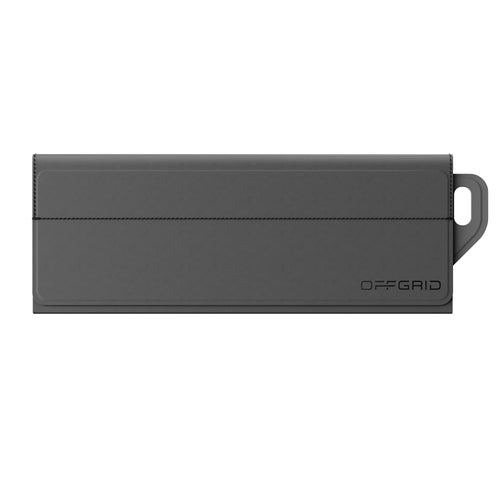
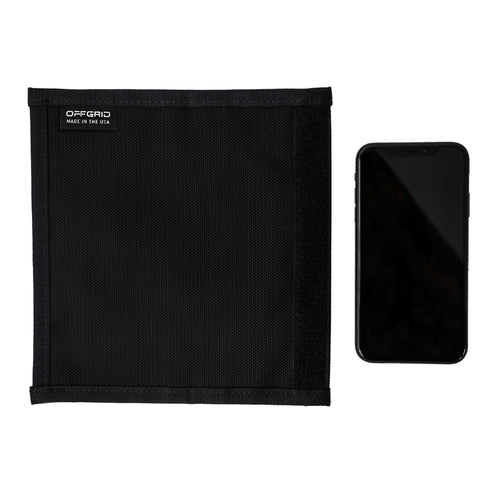
A properly designed Faraday bag takes a different approach. Instead of relying on the phone's settings, it creates a physical shielding barrier around the device to reduce radio-frequency signals entering or leaving the enclosure.
That difference matters when wireless isolation is actually the goal.
For everyday use, airplane mode may be perfectly adequate. On a flight, during a meeting or when you're trying to conserve battery, tapping a setting is quick and convenient.
But situations involving sensitive travel, digital evidence, confidential meetings or device security may call for something more deliberate.
When a Faraday Bag Makes More Sense
You don't need to put your phone in a Faraday bag every time you walk out the door.
The point is knowing when airplane mode and physical signal isolation solve different problems.
A traveler carrying sensitive information may want a simple way to isolate a phone when it isn't needed. Someone working around confidential information may need devices physically separated from wireless networks during a meeting. Digital forensic professionals may need to isolate collected devices to help prevent unwanted wireless communication while evidence is being handled.
This is where Faraday protection becomes useful.
For a phone, a compact option such as an OffGrid Fold Mobile or Utility Faraday Bag for Phones can provide physical signal isolation without requiring you to change multiple device settings.
For travel, the OffGrid Backpack Pro takes a broader approach, incorporating removable Faraday sleeves for devices alongside dedicated storage for everyday travel gear.
The products aren't replacements for good digital security practices. They're another layer for situations where controlling wireless exposure matters.
What About Bluetooth Trackers and Car Keys?
Phones aren't the only devices constantly using radio signals.
Modern key fobs communicate wirelessly with vehicles. Bluetooth trackers periodically transmit signals. Tablets, laptops, smartwatches and other connected devices can contain multiple wireless radios of their own.
That means a privacy strategy focused entirely on your phone's airplane mode can miss the bigger picture.
For example, placing your phone in airplane mode doesn't do anything to isolate the key fob sitting beside it.
For situations like that, a dedicated Faraday pouch or compartment can make more sense than trying to manage individual wireless settings across every device you carry.
Airplane Mode Still Has Its Place
None of this makes airplane mode useless.
It's actually a very useful feature.
The problem comes from expecting it to do something it wasn't designed to do.
Airplane mode gives you quick control over certain wireless connections. It can reduce interruptions, disconnect cellular service and make managing connectivity easier while traveling.
That's convenience.
Physical RF shielding serves a different purpose: creating a barrier between a device and outside wireless signals.
That's isolation.
Privacy Works Better in Layers
There isn't one button that makes a smartphone private.
Strong passwords, software updates, account security, app permissions, location settings and careful network use all matter. When wireless isolation is needed, physical shielding can become another part of that approach.
Understanding the difference is more useful than simply assuming an airplane icon means a device has gone completely dark.
Airplane mode asks your device to disconnect. OffGrid gives you another option when you need the signal itself to stay outside.